Advanced Text Search
This step configures a text search comparison within the DataAssist Search server behavior based on selecting Advanced Text Search when adding a search comparison in step 2 of the DataAssist Search Wizard: Define your DataAssist Search.
Text-based database columns are searched against using a text comparison specified through a form element. The results returned depend on whether the selected column in a given record includes the text parameter specified.
Note: The comparisons configured using this wizard are designed for standard implementations. Advanced search configurations can be achieved by either editing the application of the DataAssist Search server behavior applied to your results page by this wizard, or by applying this server behavior directly to your results page.
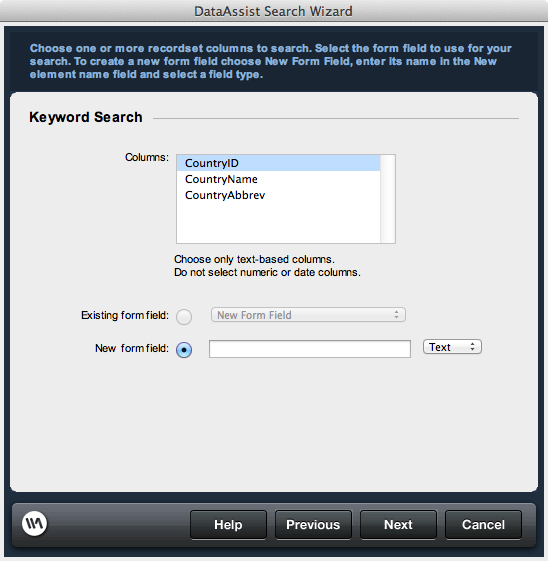
Text-based database columns are searched against using a text comparison specified through a form element. The results returned depend on whether the selected column in a given record includes the text parameter specified.
Note: The comparisons configured using this wizard are designed for standard implementations. Advanced search configurations can be achieved by either editing the application of the DataAssist Search server behavior applied to your results page by this wizard, or by applying this server behavior directly to your results page.
Columns
Select all columns to be searched against using the values passed from the specified form element (CTRL-left click for multiple selections). Columns included must be text-based.Form fields
Specify the form element used to pass the text parameter necessary to make the comparison. If you are using an existing search form (specified in Step 1 of the wizard, Search page selection), you have the option of either adding a new form element or using an existing form element. If creating a new form, specify a unique name for the form field to identify and label it. Upon completing the wizard, you may use Dreamweaver to customize the search page specific to your needs.Existing form field: If using an existing search page and form, select if you wish to use an existing form element to make the comparison. All form elements contained in the form specified in step 2 of the wizard are available in the list.
New form field: If creating a new form or creating a new search parameter in an existing form, specify the name of a new form element to add to the search form. Select the type of form element to use. Options are:
New form field: If creating a new form or creating a new search parameter in an existing form, specify the name of a new form element to add to the search form. Select the type of form element to use. Options are:
- Text
- Select
- Radio
- Check