DataAssist Search Wizard: Step 1
The General configuration page is the first step in configuring a query, and defining the high level characteristics of the search page. You have the option of selecting from an existing search page, or creating a new page. If desired, you can even specify the current page as the search page, triggering the query and the returning the results on the same page. This is useful when facilitating search on a page used to display results.
If you use an existing search page, you have the option of using an existing search form, or creating a new search form that is identified in the source code by the name you specify. If creating a new search page, you also have the option of controlling the naming convention of the form.
If you are creating a new form, the form elements are specified during the Select your search element to add step when configuring search parameters.
If using an existing search page and creating a new form, and that page has a template applied to it, select the appropriate editable region to insert the new search form within.
Once you have finished the DataAssist Search Wizard, additions are made to the search page based on the criteria specified in this step:
- The form that is either specified or created contains a form action set to the page you had open upon initiating the wizard.
- If a new form is created, the name of the form is used to correlate it to the DataAssist Search server behavior applied on the current page.
- If an existing form is referenced, a hidden form element is added to the form to correlate it to the particular DataAssist Search server behavior application on the current page.
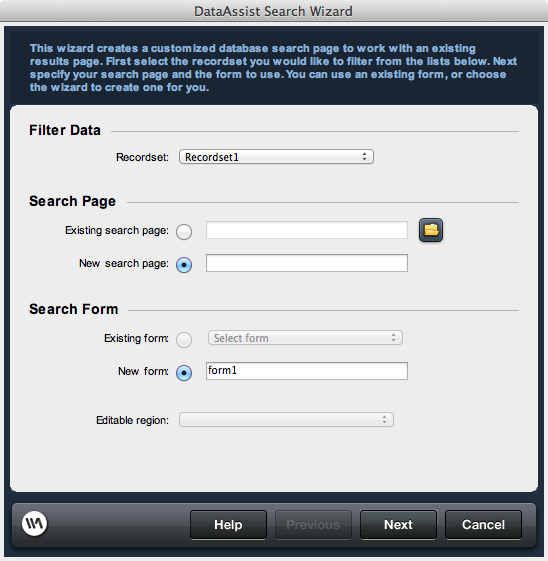
Filter Data
Specify the search page to be used or created by the wizard.
Search Page
Specify the search page to be used or created by the wizard.New search page: The new page name and location are specified here to generate this page upon completion of the wizard.
Search Form
Specify a new search form if creating a new search page. Specify an existing form or create a new form if using an existing search page.New form: If you are generating a new search page or wish to create a new form in an existing search page, specify the name of the form. Do not use the name of a form that already present on the page if using an existing page.