



Super Suite
Get all extensions for one suite price
Design Extender
Design and create unlimited websites
Data Bridge
Develop database-driven websites
eCart
Build a responsive shopping cart + checkout
MySQLi Server Behaviors
Generate streamlined MySQLi
Free PayPal Toolkit
Paypal, PayPal Credit, and Skype
Help

Create MySQLi database-driven websites in Dreamweaver with ease. Point-and-click wizards generate clean, standards-compatible code fast. Data Bridge is a tremendous value for the web professional. Build as many sites as you want—as elaborate as you want—with no limits.
Runs on: Dreamweaver CS5 and higher
View full system requirements | Get free Dreamweaver trial
Included in: Super Suite, our collection of Dreamweaver extensions
You've been hearing the warnings for years and now it has finally happened: MySQL is no longer supported in PHP. The pressure is increasing every day for web hosts to drop the old version of PHP and go with 7.0 or higher – which does not support MySQL. Any database-driven websites that depend on MySQL will break on these web hosts. No database connection, no results, no updating, no new records. Nothing coded with MySQL will work.
Don't panic! MySQLi—the primary replacement for MySQL—is here. And Data Bridge 2.0 delivers MySQLi, ready to go:
All the WebAssist MySQLi server behaviors have been re-written from the ground up for Data Bridge 2.0, resulting in a much smaller code footprint that's easier to read and faster to process.
Other major enhancements to Data Bridge 2.0 include:
Future-proof your sites! Get Data Bridge 2.0 today!
| Data Bridge feature | Former stand alone extension | Scroll to feature overview | Learn a whole lot more |
|---|---|---|---|
| Create database-driven web pages | DataAssist |  |
 |
| Migrate MySQL pages to MySQLi | New! | |
|
| Access over 90 MySQLi server behaviors | MySQLi Server Behaviors | |
|
| Require user sign-in on your website | SecurityAssist | |
|
| Create an administrative backend | DataAssist & SecurityAssist | |
|
| Create robust forms with validation | CSS Form Builder & 7 more extensions | |
|
| Generate images intelligently | Image Resizer | |
|
| Send email from your web pages | Universal Email | |
|
| Send or receive digital files | Digital File Pro | |
|
| Connect database-driven select lists | Dynamic Dropdowns | |
|
| Make your site easier to maintain | Framework Builder | |
|
| Use just one database connection file | Dynamic Connections | |
|
 Features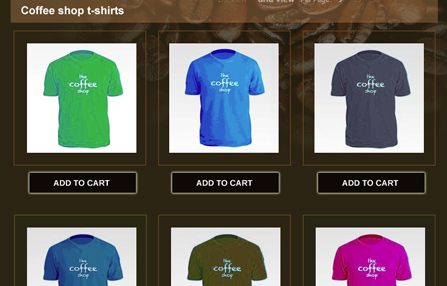
With the Data Bridge wizard, you can build any set of database-driven pages, such as online catalogs, blogs, portfolios, forums and more. Set up a database search with various advanced sorting options so that your visitors can control their search results. Each database-driven result links to a detail page, generating a professional, customizable set of pages for your dynamic site.
The Data Bridge wizard creates CSS-based web standardized page layouts. Select from the bulit-in presets for single and multiple-column pages; then use the theming engine to fully customize the look and feel of your layouts.
Once you have saved your settings in the wizard, you can recreate the architecture of your database the next time you access the wizard. This is an excellent time-saver for web professionals who are building multiple websites for clients. Learn more about the dynamic page building tools »
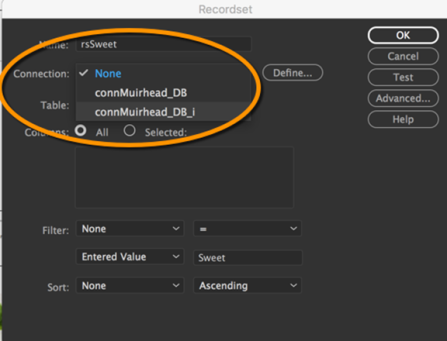
Not only can you create new MySQLi compatible sites with Data Bridge 2.0, you can quickly and easily migrate existing MySQL-based sites to the new standard, MySQLi. How quickly and easily? How's just two steps?
Step 1: Open the existing recordset or other server behavior.
Step 2: Switch to the new MySQLi connection.
Migration complete!
Data Bridge 2.0 automatically creates a new MySQLi database connection when you open a MySQL page and can be identified by the "_i" that is appended to the connection name. For example, an old MySQL connection named "localhost" would be joined by a new MySQLi connection, "localhost_i". What's more, when you migrate a recordset, Data Bridge will automatically convert any associated server behaviors (like Repeat Region or Show Region). Data Bridge 2.0 makes it just that easy.
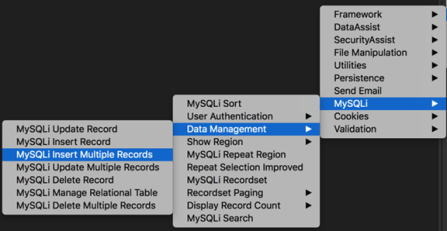
Server behaviors provide point-and-click interfaces that generate server-side code. Data Bridge 2.0 contains over 90 server behaviors that have been upgraded to create MySQLi code, including:
27 Dreamweaver legacy server behaviors. Legacy no more! If you were comfortable with the original Dreamweaver server behaviors, Data Bridge 2.0 brings them into the 21st century, outputting both MySQL and MySQLi compatible code.
37 WebAssist server behaviors. The best just got better! WebAssist server behaviors featured advanced server-side interactions, like Manage Relational Tables and Multiple Record Updates. All WebAssist server behaviors—from Framework, DataAssist, SecurityAssist, and more—now support MySQLi.
29 MySQLi server behaviors. Targeted code for the next generation. A wide range of MySQLi functionality ready to go and easy to use. Everything from Recordsets to Insert/Update/Delete to Log-in User to Repeat Region to Search—all MySQLi native, all point-and-click simple.
See full list of MySQLi compatible server behaviors. »
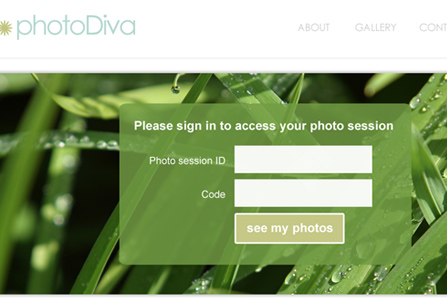
The user authentication tools generate the following pages: Log in, Log out, Register New User, Update User Profile and Email Password.
You can apply validation to the form pages and use CAPTCHA to prevent spam registration. Easily add "remember me" and automatic login to your sign in page. Encrypt user passwords (5 encryption types supported). Use the random password generator to create secure passwords; then allow your visitors to use the reset password workflow. You can store or clear specific variables in the user's browser session, set redirects if the session or cookies are disabled - and more!
Define custom access rules in the wizard to determine who can view secured content on your site. Password protect selected pages of your site and use the built-in server behaviors to hide specific regions of a page if you want to conceal certain content for certain user levels. Learn more about the user authentication tools »
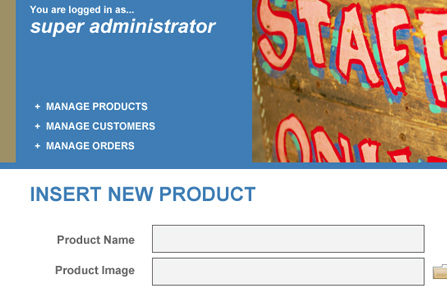
Combine the dynamic pages tool and user authentication tools to create an administrative site to manage your content, products,and more. Data Bridge presets allow you to quickly generate a set of pages structured for managing data. From these pages, the administrator can view, insert, delete and update data in your database.
Support is built-in for updating multiple records and multiple database tables at once.
Web professionals and business owners alike appreciate this feature as they can hand off the daily content and product management to somebody else - somebody that doesn't even own Dreamweaver!
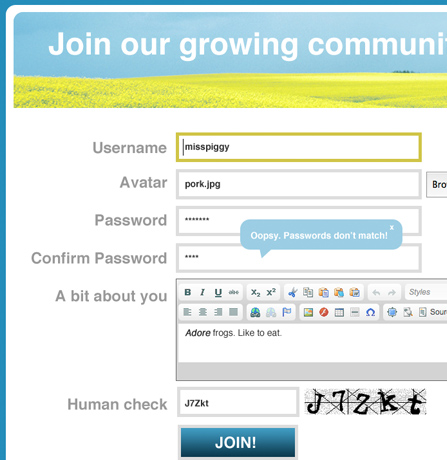
Quickly create and customize forms from a variety of design presets - including a blank preset, should you already have CSS you want the form to inherit. Or import form fields from an existing page to modify the design and add additional functionality.
Apply client-side Jquery validation tooltips and/or PHP server validation to display clear error messages for users filling out your web forms, which will ensure you receive accurate, complete and properly formatted data. Add CAPTCHA security to protect your forms from bots. Include a reload button and customize the CAPTCHA font, colors, noise level and background image.
Add HTML editor form fields so visitors can style their text, add images and more - directly in the form field. You can control the width/height of the form field. You can also skin the toolbar and select which toolbar buttons to include. Custom style sheets can be incorporated so visitors can use CSS classes to style their content - great for an administrative site.
Add modern date picker form fields. Choose from 24 datepicker designs or fully configure your own design, using the jQuery UI ThemeRoller. And while you're getting fancy, use the button styler tool to start with one of our many CSS button presets, then customize the button from the wizard, including rounded corners, gradients, background images, shadows, fonts, borders, padding, margins and hover states. Learn more about building PHP forms »

Use the image-resizing server behavior on each page, image or region to re-size images to your desired dimensions. Great for using duplicate images of various sizes on your website (such as thumbnail and full size images).
This greatly benefits your website visitors; when they land on each page, the images are instantly re-sized and cached in the browser. Caching the image saves load time! This revolutionary image-optimizing technology is also a time-saver for you if you constantly have to optimize images in Photoshop every time you add a product or photo to your site.
You can use this function in a repeat region to maintain uniformity on a page - great for a site where users are uploading images and you don't want to sacrifice your design!
Additionally, the original image is still saved in your site and referenced in the database. This means you can re-skin your site, specifying new dimensions every time, without re-cropping, re-sizing and re-optimizing your images all over again! Save yourself the hassle later by using Data Bridge the first time! Learn more about the image-resizing server behavior »

Use the email wizard on any page to send an email automatically from your site. Simply select your template from over 150 well-designed presets or your own Dreamweaver template. Then specify your recipients; even retrieve email addresses from a dynamic value, recordset loop or file.
Add digital file capabilities to the emails you configure. Allow your users to browse and attach a file - think contest entry form - or automatically include an attachment you specify in every email you send - think auto-reply email. Even attach multiple files from a database recordset.
Hosting providers set email restrictions, but this tool will help you send batch emails without getting blocked. Check your hosting provider's restrictions, then use Data Bridge to define the frequency and quantity of emails you send, as well as a delay between email batches.
Insert data in your database when emails are sent. The wizard makes it simple to choose the event you want to log and whether you want to insert or update records in your database upon success or failure. Learn more about the PHP email tool »
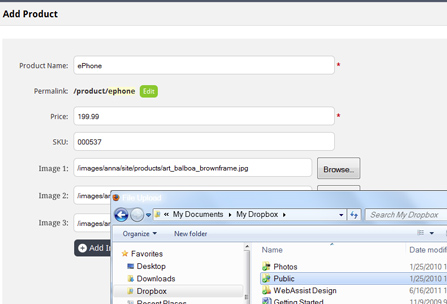
The digital file upload feature is great for allowing your website visitors to send you files. The wizard will help you determine where files should be stored on your server and how to handle duplicate file uploads. Set restrictions, if desired, on the file upload type and size. Re-size, reformat and rename files successfully uploaded to your server.
The download feature is excellent for selling digital files, such as music or software. Allow your visitors to securely download files based on conditions you set. You can manage the file name to integrate dynamic elements, and limit or track the number of times a file is downloaded. You can even have successfully downloaded files deleted.
Add a progress bar to your form so your visitors know an upload to your server - or download to their computer - is underway. Choose from 4 progress bar styles and 11 color schemes. Learn more »
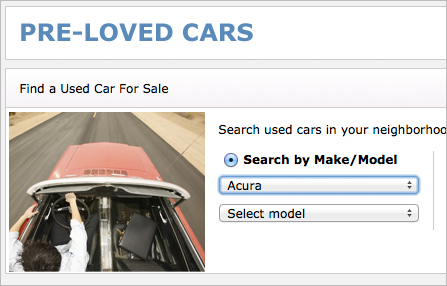
Create dynamic category / subcategory relationships with dropdown lists or multiple select lists, like you see on automobile part websites, where the website visitor can narrow down a search from manufacturer to make to model.
This is now done using Framework builder and dynamic plugins. Tutorial coming soon to help you with the necessary steps to follow.
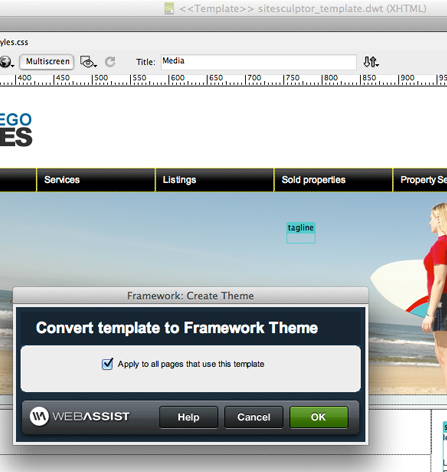
When you update a Dreamweaver template, all your files associated with that template need updating and re-publishing, a large risk for any site. Easily convert your site from DWT-dependent to "theme-based" and your template can be updated and published independently of the pages using the theme.
Watch a video on how easy it is to convert your site »
You can apply your themes individually to specific pages or set your themes to load based on a trigger variable. Learn more »
Dreamweaver users often use includes to display content on various parts of their site without duplicating the content in multiple places. However,
Dreamweaver includes have always been a nuisance. When you use includes in a site with a sub-folder structure, your paths will either work if the path is correct in the include file or will display in Dreamweaver if the path is correct in the file the include is used in. Not both!
So we invented plug-ins. The concept works the same as includes, but paths are correctly detected and dynamically updated to work both in Dreamweaver and in the browser! You can load static plug-ins, where a specific plug-in displays based on the trigger you determine (such as always load, form post, etc.) or you can also load dynamic plug-ins, where the plug-in that loads differs depending on the trigger. Learn more »
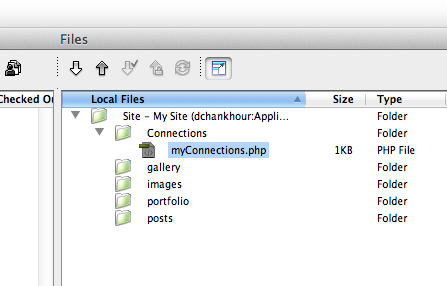
Configure single or multiple database connections using a wizard and one connection file will be automatically generated, which can be published to all of your domains. The correct database will then be detected based on the domain your visitors access.
If you use one database connection on your local testing server and one database connection on your live server, you have probably experienced accidentally overwriting a connection file before. This is a great reason to create only one connection file for both connections!
This tool is also useful if you run the same site on multiple domains, but your content varies based on the database each domain uses. If you develop one website in various languages, specify a different charset for your MySQL connections. Dozens of charsets supported. Learn more »
 Upgrading
Even if you own the above extensions, there are still benefits in upgrading:
Plus, you get these new features, exclusive to Data Bridge:
Nitty GrittyIt’s easy as pie to install an extension in the Adobe Extension Manager, but we have a installation video that will make you a pro, even if you have never installed an extension.
All HTML, CSS and PHP code that WebAssist extensions output is completely accessible for further modification and customization.
First, visit the Data Bridge support page to review the latest product documentation, tutorials and videos. If you still need help, visit our support forums, where we have over a decade of experience helping our customers be successful with our tools - for FREE!
Dreamweaver CS5.5 and higher
Don't own Dreamweaver yet? Download a free trial.
Windows or Mac
A web server that runs PHP 5.2 or higher and MySQL 4 or higher. If your computer is not already set up to be a web server, we have a tutorial that will assist you for both Windows and Mac users.
When you buy a WebAssist extension, you receive 1 serial number. You can activate that serial number on 2 computers.
You can also deactivate your serial numbers in our Download Center, should you need to install on a new computer.
One license of a WebAssist extension allows you to build as many websites as you want!
Your friends over here at WebAssist! These Dreamweaver extensions will assist you in building unlimited, custom websites.
These out-of-the-box solutions provide you proven, tested applications that can be up and running now. Build a store, a gallery, or a web-based email solution.
©1999-2026 WebAssist.com Corporation. All rights reserved and all that jazz.


Account or customer service questions?
Please user our contact form.
Need technical support?
Please visit support to ask a question


