



Super Suite
Get all extensions for one suite price
Design Extender
Design and create unlimited websites
Data Bridge
Develop database-driven websites
eCart
Build a responsive shopping cart + checkout
MySQLi Server Behaviors
Generate streamlined MySQLi
Free PayPal Toolkit
Paypal, PayPal Credit, and Skype
Help

Instead of hand coding the most complex part of a website, use eCart to guide you through building a responsive shopping cart and checkout system in Dreamweaver. Configure shipping rules, tax rules and coupons from a wizard. Use on unlimited sites to sell goods, services and subscriptions, as well as accept donations.
Runs on: Dreamweaver CS4, CS5, CS5.5, CS6, CC, CC 2014, CC 2015
View full system requirements | Get free Dreamweaver trial
Included in: Super Suite, our collection of Dreamweaver extensions
Compare with: All eCommerce solutions

 Features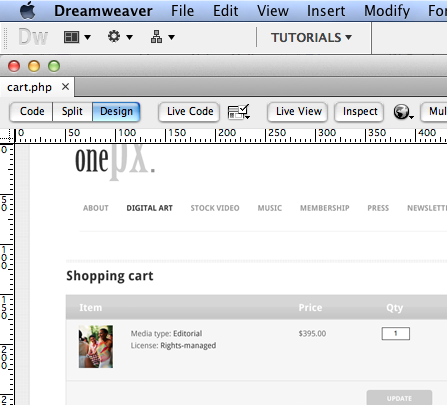
Use a wizard to design your shopping cart in Dreamweaver with ease. Select from many design presets (now responsive!) and even save your own presets. Use the built-in Color Manager to easily change colors used in the cart or use the Color Suggestions for new ideas. You can even import an image or web page that you are inspired by.
Create traditional read-only and updateable carts - or create quick carts and email-friendly carts for other pages in your site. The updateable cart design includes quantity fields, making updating the cart user-friendly. The read-only cart can be used to simply display a purchase confirmation, where no additional modifications can be made from the cart. The quick cart design can display the status of the cart anywhere on your site. The email-friendly cart is designed with minimal styling, making it compatible with email clients.
Finally, you can even build a shopping cart that doesn't require online payment; just let customers shop and simply provide a quote or allow phone payment processing.
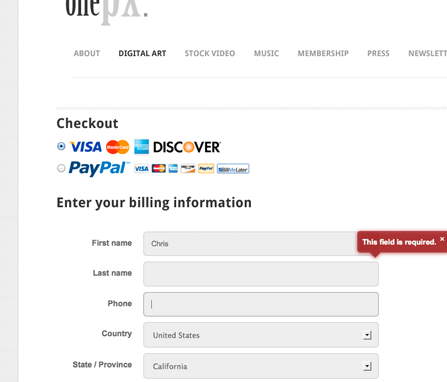
eCart creates all the necessary pages for your checkout process, in addition to your shopping cart. These include:
The pages are generated, complete with labels, HTML5 form fields, CSS buttons and Jquery validation, all customizable directly from the Checkout Wizard.
The forms use CSS layouts so you can customize the design or even use your own Dreamweaver template. The modern checkout page updates automatically, using CSS3 transition effects as your customer enters their information and makes selections on the checkout page.
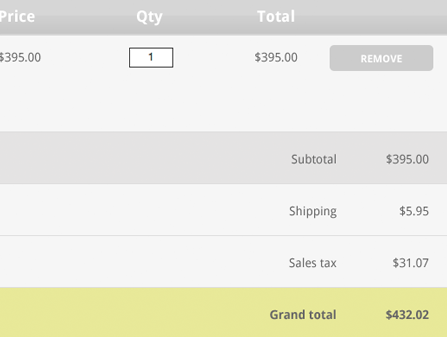
eCart provides real-time shipping quotes from these world-class shipping services: DHL, UPS, USPS, FedEx, Canada Post and Australia Post. You can use multiple providers in combination and configure rules based on the shipping quotes. The easy rules interface also lets you configure custom tax rules. Use any of these rule triggers to create your own custom rules:
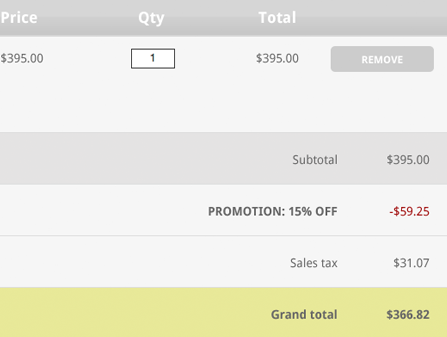
Offering discounts on your website can increase conversion, but building such a system can be incredibly overwhelming. With eCart, it's easy. Configure promotions based on any of these rule triggers:

eCart will create your add to cart, view cart and update cart buttons. With the wizard, you can choose button presets and pick the language your buttons should be generated in:
Or you can specify your own custom buttons. If you want to use the add to cart, view cart and update cart functions without buttons, eCart offers server behaviors you can utilize to apply these functions.
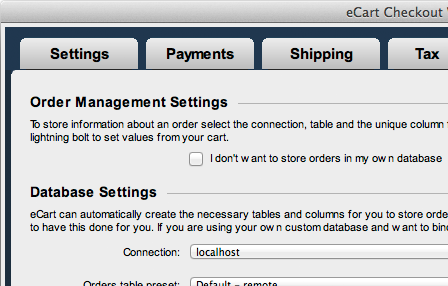
You can choose to build a static or a dynamic cart with eCart. Static carts do not require your products to be database-driven.
If you want your cart database-driven, you can choose whether to have eCart automatically create the database tables for storing your order information. This will save you time and ensure that your database has everything needed.
New in Version 6Nitty GrittyIt’s easy as pie to install an extension in the Adobe Extension Manager, but we have a installation video that will make you a pro, even if you have never installed an extension.
All HTML, CSS and PHP code that WebAssist extensions output is completely accessible for further modification and customization.
eCart can be modified to tie into other payment gateways and shipping providers; however, you will need to be comfortable hand coding a connection to your desired third party as WebAssist only supports those listed.
Use our online payment solution tutorial and our payment gateway provider comparison chart to help you decide on a payment gateway and/or merchant account.
The eCart wizard allows you to select dollars, euros, pounds, francs, or yen from the default list - or you can specify your own symbol in the custom currency field.
First, visit the eCart support page to review the latest product documentation, tutorials and videos. If you still need help, visit our support forums, where we have over a decade of experience helping our customers be successful with our tools - for FREE!
Data Bridge - our extension that helps you build database-driven pages. You can build a product catalog (your store's search, results and detail pages) or an administrative backend to manage products, users and orders with Data Bridge.
Dreamweaver CS4, CS5, CS5.5, CS6 or CC
Don't own Dreamweaver yet? Download a free trial.
Windows or Mac
A web server that runs PHP 5.2 . If your computer is not already set up to be a web server, we have a tutorial that will assist you for both Windows and Mac users.
MySQL 4 or 5. Although building a static cart does not require a database to use eCart's add to cart buttons in your product catalog, a database is still required to store the details for your orders. Take advantage of our free eCommerce MySQL database if you don't already have a database.
SSL certificate required if utilizing seamless checkout. Learn more »
Click any of the links below to sign up for one of eCart's supported payment options.
Remote payment gateways:
Local payment gateways:
Click any of the links below to sign up for one of eCart's supported gateways. Or learn more about shipping providers »
UPS, USPS, FedEx, and Australia Post
When you buy a WebAssist extension, you receive 1 serial number. You can activate that serial number on 2 computers. You can also deactivate your serial numbers in our Download Center, should you need to install on a new computer.
One license allows you to build as many websites as you want!
Your friends over here at WebAssist! These Dreamweaver extensions will assist you in building unlimited, custom websites.
These out-of-the-box solutions provide you proven, tested applications that can be up and running now. Build a store, a gallery, or a web-based email solution.
©1999-2024 WebAssist.com Corporation. All rights reserved and all that jazz.


Account or customer service questions?
Please user our contact form.
Need technical support?
Please visit support to ask a question


