On Sale - Super Suite 44% off - Click here to learn more

System Requirements

Windows

  • Windows Vista, Windows XP SP2, or Windows Server 2003
  • 128 MB RAM (256 MB recommended)
  • Dreamweaver CS4, Dreamweaver CS3, Dreamweaver 8
  • Works with static, dynamic or template pages.

One of the following Application Server Models

  • Coldfusion 6.x and later
  • ASP JavaScript
  • ASP VBScript
  • PHP 4.2 +

Macintosh

  • Mac PowerPC or Mac Intel
  • MacOS 10.4.x, MacOS 10.5.x
  • Dreamweaver CS4, Dreamweaver CS3, Dreamweaver 8
  • Works with static, dynamic or template pages.

One of the following Databases

  • Microsoft Access (with ASP and Coldfusion)
  • Microsoft SQL Server (with ASP and Coldfusion)
  • Oracle (with ASP and Coldfusion)
  • mySQL 4 & mySQL 5 (with PHP)

Need a hosting provider?

  • WebAssist has partnered with 1&1. Click here to learn more.

Close

Close

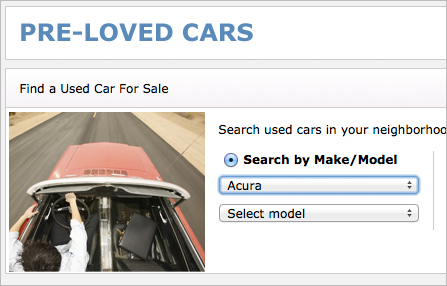
A drop down menu representing Dynamic Dropdowns

Dynamic Dropdowns 2

Ensure your customers find what they are looking for with dynamically connected select lists or dropdown lists.
Included in the Extension Library membership program  Learn More

Product Summary

Dynamically connecting dropdown lists or multiple select lists can be a challenge. However, Dynamic Dropdowns helps alleviate the pain involved with accomplishing this task. Implement key functionality necessary for providing your customers with the unique searching capabilities found on most automobile part websites.

No Coding
Dynamic Dropdowns eliminates the need for hand coding allowing you to connect multiple dropdown lists or multiple select lists.
Unique Search
Connecting dynamic dropdown lists and multiple select lists is the first step in providing your site visitors with a unique and focused way to search your website or product catalog.
User Controls
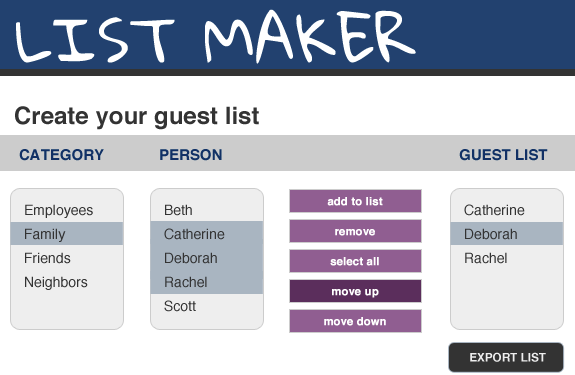
With Dynamic Dropdowns you can give your site visitors enhanced control over the items contained in your menu lists such as select all, add to list, move up, move down, and delete.
Speedy Results
All data arrays are created when the page loads. Therefore, queries only hit the server once allowing dropdown lists and menu lists to populate quickly.

Screenshots

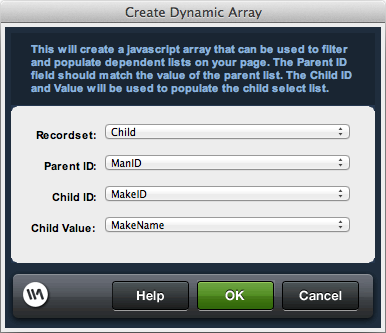
Populate List From ArrayAdd Value From Source List To Target ListSet Selected In ListSelect All in ListRemove Selected From ListChange Position of Selected

Features

  • Create dependent drill-down lists easily
  • Multiple lists levels with repeated applications
  • Point-and-click interface
  • Descriptive text option
  • Single load strategy
  • Prepend parent name option
  • List item management
    • Add to list
    • Remove
    • Select all
    • Move up
    • Move down
  • Create Dynamic Array server behavior
  • Populate List from Array server behavior
  • Add Value from Source List to Target List server behavior
  • Remove Selected from List server behavior
  • Change Position of Selected server behavior
  • Select All in List server behavior
  • Set Selected in List server behavior
  • Supports Dreamweaver CS4, Dreamweaver CS3 and Dreamweaver 8
  • Multiple server model / database support
    • ASP-JavaScript / ODBC
    • ASP-VBScript / ODBC
    • ColdFusion / ODBC
    • PHP / MySQL

What is the difference between purchasing and signing up for a membership?

When you purchase a Dreamweaver extension or Super Suite, you own that software and will automatically receive dot release updates (updates within the same version of a product you own). Any full version upgrade that is released after 30 days from your initial transaction would require you to purchase that version at a discounted upgrade price. By enrolling in the WebAssist Extension Library Membership Program you have automatic access to all existing WebAssist Dreamweaver extensions, premium content, new extensions as well as content or product updates that are added during your membership.

Do I need to own Dreamweaver to use Dynamic Dropdowns?

Yes, you will need Dreamweaver 8, CS3 or CS4 to run Dynamic Dropdowns.

Do you offer a trial or demo of Dynamic Dropdowns?

WebAssist is not currently set up to offer trials or demos of our products. Instead we offer a 15 day money back guarantee with every Dreamweaver extension.

Can Dynamic Dropdowns be used without any coding knowledge?

Yes. Dynamic Dropdowns can be used without any prior coding experience or knowledge.

What is the difference between Dynamic Dropdowns and CSS Menu Writer?

Dynamic Dropdowns allows you to dynamically connect multiple dropdown lists or multiple select lists for enhanced website searching capabilities. CSS Menu Writer creates vertical or horizontal CSS-based menu navigation for your website.

What other products might I want to consider?

Many customers watch our free Database Stater Kit for PHP prior to using Dynamic Dropdowns and often use it in conjunction with DataAssist when creating an online store. As such, many customers enroll in the WebAssist Extension Library Membership Program because it includes these three products.