Do More

Web Developer Suite 

Build better Web applications, faster and with greater functionality – and save.

buy now:

$374.99 Regularly $499.99

*Offer ends May 9, 2008

Feature Tour

international pricing:


upgrade center:

Make the most of your investment: visit the Upgrade Center.

for sales questions:

Email sales@webassist.com

U.S.
Monday - Friday, 9AM - 5PM PST
800.886.0130 Option 2

Europe
Monday - Friday, 9AM - 5PM GMT
+44 (0) 170.453.3838

Outside U.S. and Europe
Monday - Friday, 9AM - 5PM PST
+1.760.633.4013 Option 2

Pay by check
Download order form

Overview Features System Requirements Support
Web Developer Suite

Value priced Web application power

Web Developer Suite brings together all the best Web application extensions for one low price. Moreover, if you own DataAssist, SecurityAssist, Digital File Pro, Universal Email, Database Search, Validation Toolkit, Dynamic Dropdowns, or Cookies Toolkit, there's an upgrade path waiting for you to get the full package.

Many dynamic applications, zero hand-coding

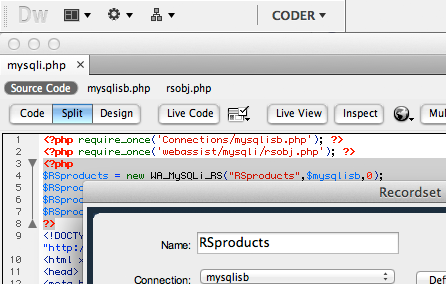
The Web Developer Suite features point-and-click wizardry for many operations. Generate an entire log in/registration system with SecurityAssist or all the pages to manage a database online with DataAssist – all without touching the code.

Essential utilities ready to roll

Need to validate a form or set a cookie? How about setting up a secure download or client-friendly upload? Maybe a high-powered search or drill-down menus is on the wish-list? Make all your wishes and needs come true with the extensions of the Web Developer Suite.

Database-driven sites, explained and exemplified

Example databases and the interactive training you need to know how to use them are also a feature of Web Developer Suite. Get the Database Starter Kit for ASP with sample Access/SQL Server databases and the Database Starter Kit for PHP with MySQL databases.

Build as many sites as you want – for one price

All WebAssist products in Web Developer Suite come with a developer’s license, so you can create site after site, and just pay once.
DataAssist, Database Search, and the Database Starter Kits for ASP and PHP

Database control and schemas, too!

Manage your database data online with DataAssist. DataAssist generates all the pages you need to search, insert, update or delete any record. Just getting started with databases? The included Database Starter Kits (one for PHP/MySQL and ASP/Access) provide 3 database sample schemas to use.

Enhanced database search features

Quickly construct an entire search application in one step with the Database Search wizard. Whether you want to offer advanced Google-like text searching, date ranges, price ranges, and multiple checkboxes individually or all together, you can do it all – and so much more – with Database Search.
Validation Toolkit and SecurityAssist

Master file uploads and downloads

Control both your downloads and uploads with Digital File Pro. Seamlessly upload images, documents or any other digital file to your site, without FTP. Trigger a download on the conditions you set, from the folder you choose and the file name you select – statically or dynamically.

Send HTML or plain emails automatically

With Universal Email, you’ll be able to send personalized text or HTML emails to anyone who provides a valid email address on your site. Use Universal Email to send an order confirmation, forward a wish list, provide tailored product options and more.
Digital File Pro and Universal Email

Imports the whole site

Site Import preserves the structure of a site as it imports it. Once brought into Dreamweaver, open up Site Map view to get a visual representation of the site. Want to explore a site locally? Just preview any page in the browser and follow the links.

Dynamic and database-driven sites, too

Site Import works its magic with all kinds of Web sites – including those developed with ASP, ColdFusion, PHP or even .NET. Site Import stores the browser representation of any dynamic page, re-writing file names and URLs to maintain links and site structure.
Cookies Toolkit and Dynamic Dropdowns

Drill down categories made simple

Dynamic Dropdowns from WebAssist creates dependent select lists, for quick category sorting. Using a common sense search approach, you can quickly create drill-down categories that direct your customer straight to what they looking for.

Set, get and delete cookies

Cookies Toolkit allows you to quickly set, get or delete the cookies in any website. You’ll have the option to set the expiration date and the value – either pulled directly from a form element or entered manually at design-time.

Windows

Windows Vista, Windows XP, Windows Server 2003
Dreamweaver CS3, Dreamweaver 8

Macintosh

Mac Power PC 10.4.x, 10.5.x
Mac Intel 10.4.x, 10.5.x
Dreamweaver CS3, Dreamweaver 8

Application Server Models

ASP JavaScript
ASP VBScript
PHP 4.2 +

Databases

Microsoft Access (with ASP)
Microsoft SQL Server (with ASP)
MySQL 4 & MySQL 5 (with PHP)

Technical Support

With your purchase of Web Developer Suite, you receive 6 Technical Support incidents, a value of $179.94. Technical Support Incidents are handled by senior support personnel quickly and efficiently. Intial responses to a submitted incident are returned within 2 to 4 business hours.

General Tech Notes

Understanding WebAssist Activation
WebAssist uses product activation to help eliminate piracy and keep software costs low. This TechNote discusses WebAssist product activation and what to do when you encounter an activation error.
WebAssist Triggers - Unleash the Power
One feature unique to WebAssist extensions is the concept of triggers. A trigger detects a specific event and runs a server behavior or other function. The power of triggers in WebAssist extensions lies in the flexibility they give you as a developer. Unlike the triggers in native Dreamweaver server behaviors, WebAssist triggers can fire in reaction to many different kinds of events, even those contained in other pages. This document provides background information and discusses the appropriate use of the various triggers available.

Database Search Tech Notes

Changing Form Elements in Database Search
The Database Search wizard inserts a form element for each search type requested. For example, if you specify an Advanced Text Search you might initially select the default option, a text field. After the search form is generated by Database Search, you can easily change the text field to another form element such as a series of checkboxes, a radio button group or a select list.

Recipes

Validation Toolkit Recipes
Learn how to validate forms - client-side, server-side or both.

Solution Recipes

Digital File Pro Solution Recipe
Get step-by-step instructions for making the most of Digital File Pro. Follow this multimedia presentation to learn how to deliver digital goods with Digital File Pro, eCart and Universal Email. Developers of administrative sites will discover how to store files online while inserting new database records or updating existing ones with Digital File Pro and DataAssist.
Universal Email Solution Recipe
Get step-by-step instructions for making the most of Universal Email. Follow this multimedia presentation to learn how to send plain text emails using form data, customized HTML emails using form data, and how to create email online store receipts using eCart order data.
Cookies Toolkit Solution Recipe
Cookies Toolkit includes a complete Solution Recipe that explains how cookies work and provides step-by-step instructions for recalling complete forms, automating logins, and maintaining form data across pages.

Spacer
Spacer
- 4 Days only! - 
Save 25% Store-wide 
Expires Friday, May 9th, 2008
Spacer