On Sale - Super Suite 44% off - Click here to learn more

System Requirements

Windows

  • Windows Vista, Windows XP SP2, or Windows Server 2003
  • 128 MB RAM (256 MB recommended)
  • Dreamweaver CS4, Dreamweaver CS3, Dreamweaver 8
  • Works with static, dynamic or template pages.

Macintosh

  • Mac PowerPC or Mac Intel
  • MacOS 10.4.x, MacOS 10.5.x
  • Dreamweaver CS4, Dreamweaver CS3, Dreamweaver 8
  • Works with static, dynamic or template pages.

Need a hosting provider?

  • WebAssist has partnered with 1&1. Click here to learn more.

Close

Close

Arrows wrapping around a web page signifying the ability to import a website

Site Import 3

Import websites into Dreamweaver for your own use and exploration with our website downloader
Included in the Extension Library membership program  Learn More

Video Feature Tour

Click the video icon to the right to see how to import virtually any static or dynamic website into Dreamweaver.

Play Video

Product Summary

Site Import is a unique product that gives Dreamweaver users the ability to easily import websites. Whether you are looking to import a website into Dreamweaver to discover how a specific feature was achieved or want to recreate a website's Dreamweaver template for your own use - Site Import will give you the power you require.

Effortless Website Download
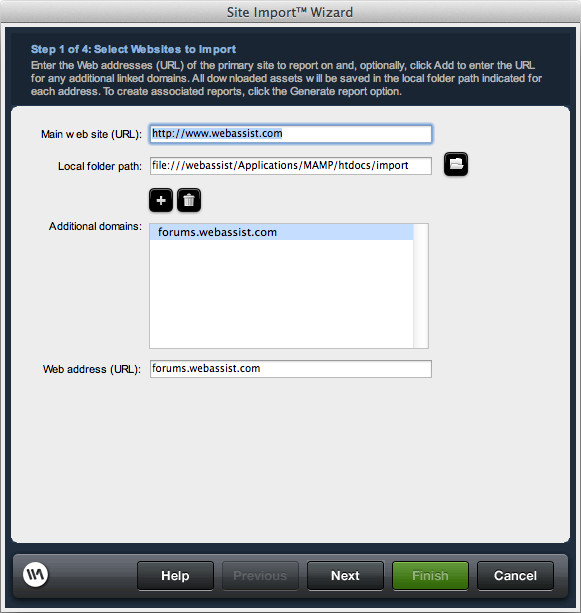
Site Import can download and import virtually any static or dynamic website into Dreamweaver with a few clicks of your mouse.
Recreate Templates
Simply check a box within the Site Import Wizard to automatically recreate any Dreamweaver templates that have been used by the website you are importing.
Import Control
Site Import will allow you to import an entire website or a single web page. You specify the number of pages and even the number of sub-domains you want to import.
Specify File Types
Use Site Import to easily specify any file types that you would like to download such as PHP, ASP, PDF, or JPG.

Screenshots

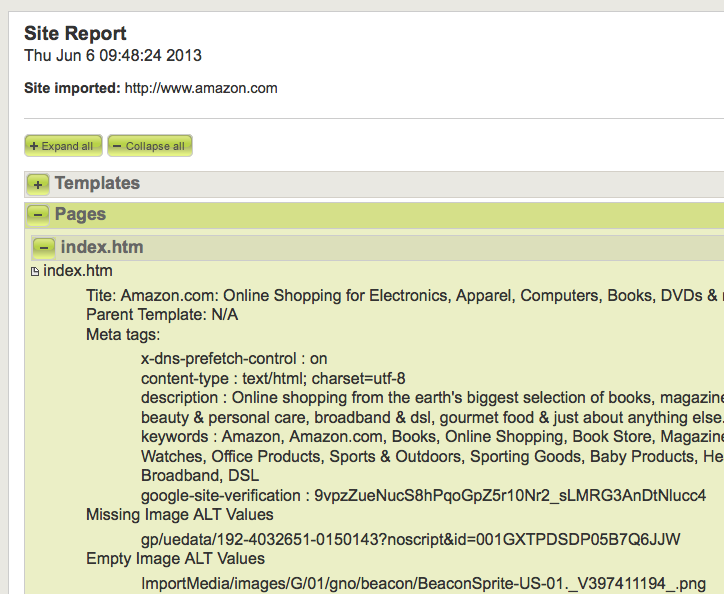
Select Website to ImportConfigure Link SettingsSelect the Number of Nested LinksChoose the File Types to DownloadConfigure Report OptionsSite Import Crawling a SiteExample Report

Features

  • Easy to use Site Import Wizard
  • Import an entire website
  • Imports specified pages
  • Imports branches of site
  • Import websites directly into Dreamweaver
  • Converts dynamic pages to standard HTML
  • Pause and resume import process
  • Unlimited import
  • Imports specified sub-domains
  • Specify file types to import
  • Recreate Dreamweaver templates from child pages
  • Complete site reporting
  • Reports broken links
  • Reports media files
  • Reports missing ALT tags
  • Reports Dreamweaver templates
  • Reports child pages derived from templates
  • Works great with eCart, DataAssist, Universal Email and SecurityAssist
  • Supports Dreamweaver 8, CS3 and CS4

Is Site Import included with the WebAssist Extension Library?

Yes, with your purchase of the WebAssist Extension Library you receive access to all WebAssist extensions including Site Import.

Do I need to own Dreamweaver to use Site Import?

Yes, you will need Dreamweaver 8, CS3 or CS4 to run CSS Menu Writer.

Do you offer a trial or demo of Site Import?

WebAssist is not currently set up to offer trials or demos of our products. Instead we offer a 15 day money back guarantee with every Dreamweaver extension.

Can Site Import be used without any coding knowledge?

Yes. Site Import can be used without any prior coding experience or knowledge.

Can dynamic database-driven sites be imported?

Yes. Site Import can import a dynamic database-driven site; however it will not import the database or any server-side files.

Am I limited to the number of pages or the size of a site that I can import?

No. You specify how many levels deep to import, as well as the maximum number of files that should be downloaded. There are no limitations to how many pages you can specify.

Does Site Import allow for the inclusion of multiple sub-domain web addresses?

Yes. Site Import now gives you the power to retrieve content stored on domains linked from the main site. Additionally, you can import as many related domains as you like simply by listing them in the Site Import Wizard.

Are there any reporting features included with Site Import?

Yes. You can report on any site, locally (with a localhost Web server) or remotely. Your report includes details regarding broken links, alt. text and template usage.

Will I have the ability to specify the files types that I want to import?

Yes. You can specify exact file types that you would like to import such as .PHP or .PDF.

Does Site Import include the ability to pause and resume the export process?

Yes. You can start, pause, and resume downloads at any time.

Can I import a website's database or secure pages?

No. Site Import is a designer tool that will import exactly what you see in the browser directly into Dreamweaver. Site Import cannot import a websites backend or any secure pages.

Can Site Import retrieve Flash (.swf/.flv) content?

No. Site Import is not capable of importing Flash (.swf/.flv) content.

What other products might I want to consider?

Many customers find the WebAssist Extension Library Membership Program, which contains Site Import, tremendously helpful in the overall design process.