



Super Suite
Get all extensions for one suite price
Design Extender
Design and create unlimited websites
Data Bridge
Develop database-driven websites
eCart
Build a responsive shopping cart + checkout
MySQLi Server Behaviors
Generate streamlined MySQLi
Free PayPal Toolkit
Paypal, PayPal Credit, and Skype
Help

Specify the size you want an image to display on any PHP web page (in the HTML or CSS), then apply our revolutionary image optimizing server behavior in Dreamweaver. When a user visits the web page, the image is intelligently resized and cached in their browser.
This tool was once a stand-alone extension called Image Resizer. Now it is integrated into our powerful Dreamweaver extension, Data Bridge.
 How to re-size your images intelligently
To use the image resizer tool, you simply specify the size you want an image to display by typing the dimensions in your html or CSS. Then, in Dreamweaver, select:
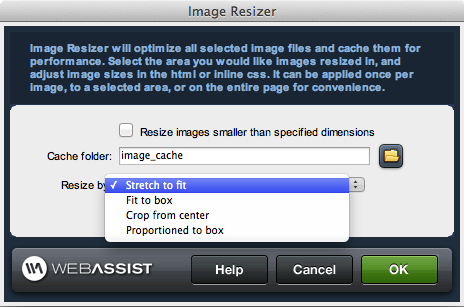
Next you apply Data Bridge’s built-in Image Resizer server behavior. This interface lets you choose a folder in your website to store cached images and gives you multiple methods for resizing or cropping the image(s).
Code is generated for your page to properly resize and cache your image(s) when the web page loads in a browser. And it doesn’t shrink or rasterize the original image!
 How this saves you time
Because the image is resized in the website visitor’s browser and not in your Dreamweaver website, you still keep the original image in tact. This means you can change the dimensions of your images directly in the html or CSS - by a single pixel or a drastic re-design. Either way, you won’t have to re-crop, re-size and re-optimize your images all over again! This is a huge time savings for any website that will have a life span of more than one version! And let’s face it; in most cases, more than one version should be the plan!
Because the image is cached in the website visitor’s browser, it also saves on page load time - a great benefit for your visitors.
Generate multiple image sizes with one imageImagine how much time you can save on a site that features dozens (hundreds, thousands...) of products. All you need to do is specify the image size and apply this server behavior for each page (the product results, product detail and shopping cart pages, for example), and the correct image sizes get dynamically generated. No need to crop out and optimize a different image for each page your products will display on!
Below, you can see an example of one image on one page, dynamically resized to two different dimensions. The developer did not have to re-size and re-optimize these images.

Maintain a consistent grid and design uniformityMany web developers use this tool in a repeat region to maintain design uniformity on a page. For example, say you have a website where users are uploading photos that are displayed dynamically, but you want to keep them in a grid format. It's unrealistic to expect all of your users to upload the same size image, but you don’t want your page to look awful with some giant images and some tiny images. So take control of your design by applying this image resizing server behavior to the grid and your images will all be sized or cropped (you decide) to the correct dimensions.
Some other types of grid-like web pages that you may want to utilize this tool are:
Even if your pages aren’t grid-like, but you just want to keep a very consistent feel throughout a website, this tool is useful. For example, you may want all of your product detail pages to use images of the exact same dimensions so the user’s eye isn’t jumping around as they go from product to product.
Your friends over here at WebAssist! These Dreamweaver extensions will assist you in building unlimited, custom websites.
These out-of-the-box solutions provide you proven, tested applications that can be up and running now. Build a store, a gallery, or a web-based email solution.
©1999-2024 WebAssist.com Corporation. All rights reserved and all that jazz.


Account or customer service questions?
Please user our contact form.
Need technical support?
Please visit support to ask a question
